Manual (Imperial units) — version 2.0 (99) · Metric units
Overview
Baltic Blender uses the GERG-2004 real gas model so a gas blender can use partial-pressure techniques to blend available gasses to a desired final mixture — accurately, without fudge factors.
It is not a substitute for proper training in the safety, handling, and blending of high-pressure gasses. It is a tool to perform the math. Gas blending is one of the few activities where a mistake can kill not just you, but the people around you and the diver you are blending for.
Traditional partial-pressure blending has two built-in errors the blender normally compensates for by hand:
It uses the ideal gas law, but the gasses we breathe at cylinder pressures are far from ideal. Baltic Blender uses GERG-2004 instead.
It ignores the heat produced as gas enters the cylinder. Baltic Blender asks you to let the temperature stabilise between steps and to measure the cylinder-wall temperature (an inexpensive infrared thermometer works well).
Throughout the manual it is assumed you have the equipment and knowledge to safely deliver each gas at the required pressure into a cylinder — a source of high-pressure oxygen and oxygen-compatible air, plus helium if you blend trimix, and usually a gas booster.
Blending trimix (any helium mix) and gas volumes & the bill are in-app purchases — see "Unlocking features". Everything else in this manual works without either.
Basic concepts
Traditional partial-pressure blending has you calculate a target pressure for each gas to add. That only works if temperature is held constant — and the gas in a cylinder heats substantially as pressure rises.
Baltic Blender works internally in molecules of gas per unit volume. Consider an AL80 (about 11 L water volume) filled to 3000 psi at 70 °F. Heat it to 100 °F and it now reads about 3247 psi. It does not contain more gas — the same gas is just hotter and at higher pressure.
Every fill step gives you a pressure to reach at the temperature you measure and enter. If you reach that pressure at a different temperature, you have added the wrong amount.
Mixture & the gas picker
Mixture is the relative percentage of oxygen, helium, and nitrogen. EAN 32 is 32% oxygen, balance nitrogen. Trimix (Tx) is written oxygen then helium: Tx 10/70 is 10% oxygen, 70% helium, balance nitrogen.
Always confirm the diver is trained and certified for the mixture requested.
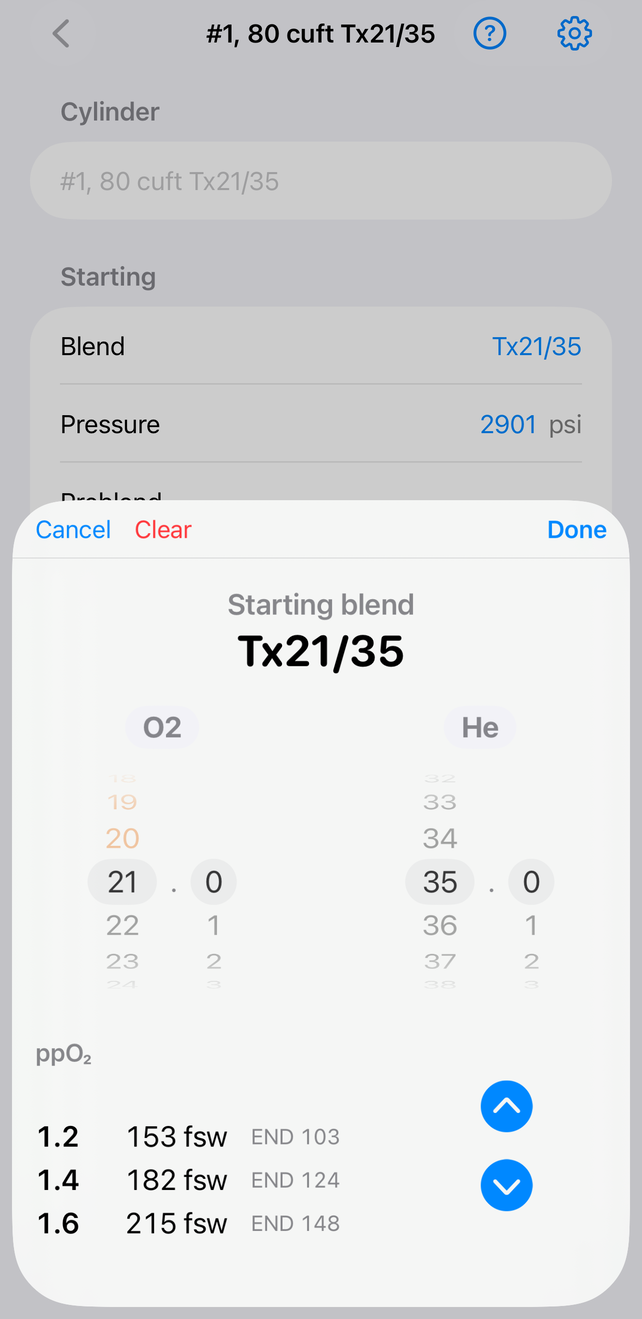
Tapping a mixture field opens the picker:
The gas picker, with MOD/END readouts below the wheels
Four wheels set oxygen and helium in whole percent and tenths (assuming Helium mixing is purchased see "Unlocking features").
The up / down arrows below the wheels step through the default gas blends list. Edit this list in Settings.
Below the wheels the picker shows MOD for ppO₂ 1.2 / 1.4 / 1.6 (specific ppO₂s are configurable in Settings) and the END at each MOD. END uses nitrogen+helium+oxygen by default; this can be changed in Settings.
A gas below 20.9% oxygen is shown in orange; below 18% in red to indicate hypoxic/normoxic.
There are some alternatives to this imnput;
Settings has a Blend entry option, Use a number-pad for blend entry, if you prefer typing over wheels. Additionally for each of start/preblend/target mixes, you can enable picking from the default gases with an option to switch to wheel/number-pad input.
Pressure
All pressures are gauge (relative to the atmosphere), not absolute. An empty cylinder reads 0 psi gauge, which is about 14.7 psi absolute.
Fills at altitude introduce a small error — roughly 4 psi at 7000 ft. Use a good digital gauge that reads relative to ambient.
Temperature
Every temperature is the temperature of the gas inside the cylinder. You can't measure that directly, so you wait for the gas to reach equilibrium with the cylinder wall and measure the wall.
After adding gas, keep watching the temperature — it keeps rising for a few minutes and then stabilises. Experience teaches how long is long enough. An infrared thermometer works well, even a cheap one. Point it at a sticker or tape on the cylinder, not bare metal (bare metal reflects and reports the wrong temperature).
There are three temperature controls:
The one in the Starting section is the cylinder's temperature when you read the starting mix and pressure. Do not change this once blending starts.
The one in the Result section is the current cylinder temperature. You adjust this as you work through the steps — it is the one you use most.
A third appears above the steps when you short-fill a preblend gas (see "Using preblended gas that runs out").
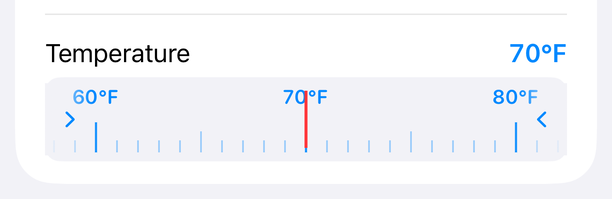
The ruler is a scrolling tape — drag it under the fixed red marker. Tap the arrow at either end to nudge it one step for precision.
Starting & desired mixture
Enter what is in the cylinder now in the Starting section: mixture, pressure, and temperature. Even an empty cylinder holds gas at atmospheric pressure, so you still enter a starting pressure (zero), a mixture (air, or whatever was last in it), and a temperature.
Enter what you want in the Target section: mixture and pressure. The pressure is always at the configured standard temperature (default 70 °F) — you do not enter a final temperature. Regulations generally forbid a cylinder from exceeding its marked service pressure at 59–70 °F, so a cylinder that reads over service pressure while hot is not necessarily overfilled once it cools.
The step-by-step instructions appear only when Starting and Target are both complete. Once they are, don't change them until this cylinder is done.
Nitrox into an empty cylinder
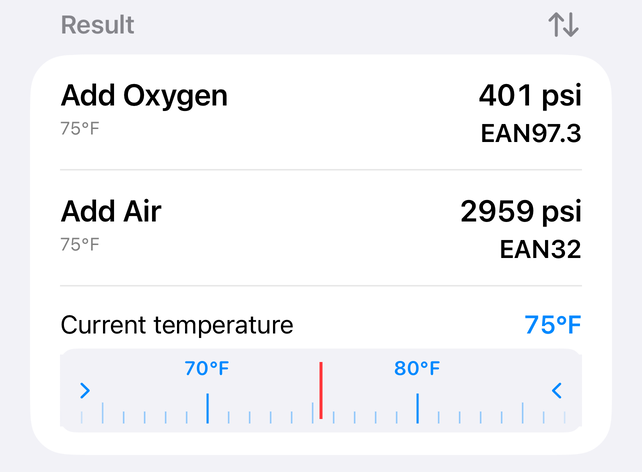
A customer brings an empty AL80 and wants EAN 32. It was open to the atmosphere, so enter a Starting mixture of air at 0 psi and the measured starting temperature, say 75 °F. Leave Preblend blank. Enter a Target of EAN 32 at 3000 psi.
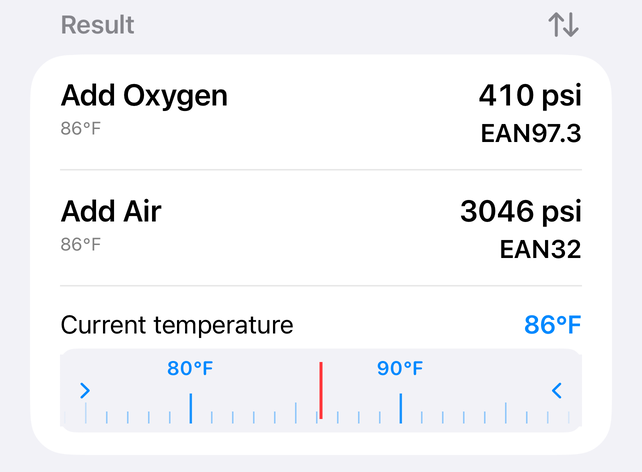
The first step says to add oxygen to about 413 psi at 75 °F. As you add it the cylinder heats, so you have actually added less than needed. Wait a few minutes, measure again — say 85 °F — and enter that in the Result temperature. The app now shows the correct oxygen pressure at 85 °F, about 422 psi. Add the last bit of oxygen. 413 psi at 75 °F and 422 psi at 85 °F are the same amount of gas.
Before adjusting the Result temperatureAfter adjusting it to the measured 30 °C / 85 °F
The second oxygen addition is small, so the extra heating is negligible — proceed to the air without re-measuring.
Now add air. The app says add air to about 3140 psi at 85 °F. Let it stabilise, measure — say 120 °F — enter that, and the app now calls for about 3432 psi at 120 °F. This is a big step with a lot of heating, so you may need a third iteration to hit the target pressure at the measured temperature.
Let the gas homogenise, analyse it, and deliver the cylinder.
Sources of error
Don't fudge. Following the instructions loosely only adds error with a real-gas model. With experience you may deliberately overshoot the final air fill knowing heating will bring it down — but measuring twice is better.
Bleed the fill whip when changing gasses. A long whip or manifold holds gas the app can't see; switching from oxygen to air without bleeding drives leftover oxygen into the cylinder. Critical for hypoxic trimix.
Sensor error looks like blend error. Oxygen sensors are only accurate when calibrated on dry gas near the mix being tested. Helium sensors are often only good to 2–3%. If Tx 21/35 analyses as 20.8/37.5, that is almost certainly the analyser, not the blend — do not "correct" it.
With patience and technique the app reliably hits oxygen within 0.2% and helium well within analyser accuracy.
A partially full cylinder
The same customer returns wanting EAN 36. You analyse the cylinder: EAN 32.3 at 526 psi and 75 °F. Enter that as the Starting mixture; enter Target EAN 36 at 3000 psi.
Add oxygen, measure and enter the temperature, top off the oxygen, add air, measure and enter the temperature, top off the air. Blending into a partially full cylinder is no different from an empty one.
A blend that needs a bleed
The cylinder analyses at EAN 36.1 at 2500 psi and 75 °F and the customer wants EAN 32 at 3000 psi. It already has too much oxygen — topping off with air would give roughly EAN 34.
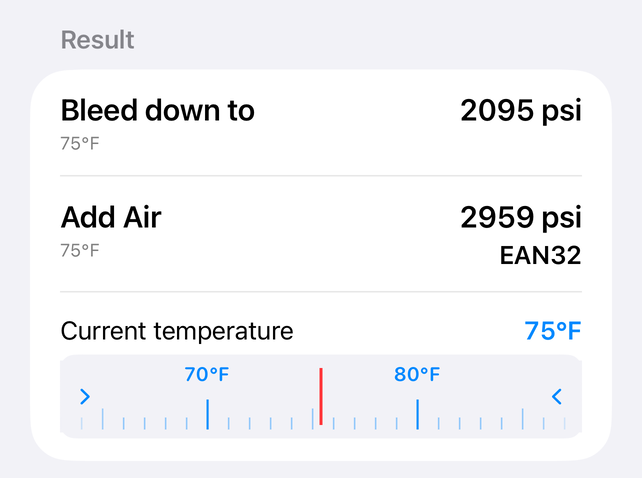
The app calls for bleeding down to about 2159 psi at 75 °F. As you bleed, the cylinder cools — wait, measure (say 65 °F), enter it, and do a final bleed to the corrected pressure, about 2104 psi at 65 °F. Then add gas as instructed.
A bleed step in the Result section
A blend that needs a bleed always leaves at least one of oxygen, helium, or nitrogen with nothing to add. A bleed for too much nitrogen means adding oxygen or helium at high pressure (3000–3500 psi or more) — which needs a booster and scrupulously clean, oxygen-safe equipment. You can trade economy for safety by bleeding more than the minimum so the oxygen goes in at a lower pressure: enter the new (lower) starting pressure and temperature in Starting, then add the gasses.
Trimix & step order
This example blends helium — it needs the Helium in-app purchase. See "Unlocking features".
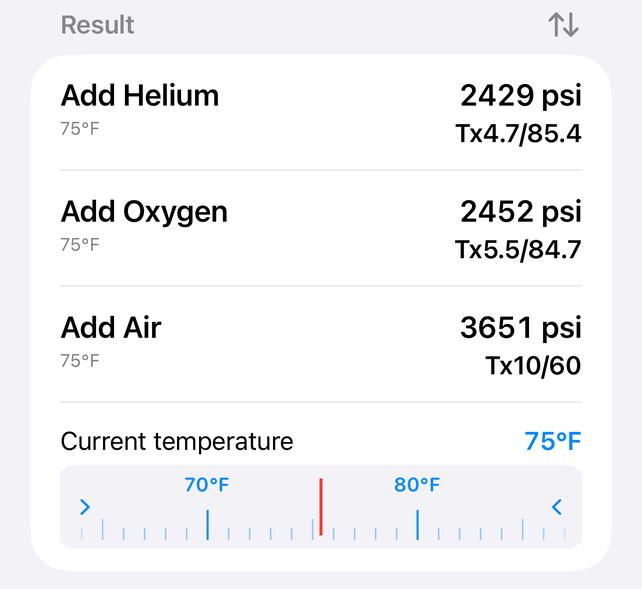
A set of doubles holds 500 psi of Tx 21/35 at 75 °F and the customer wants Tx 10/60 at 3600 psi. Enter Starting and Target. The steps show helium, then oxygen, then air, in that order.
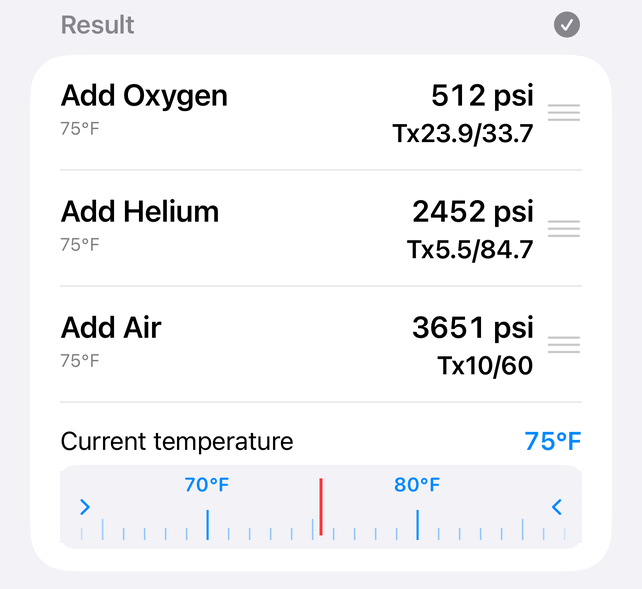
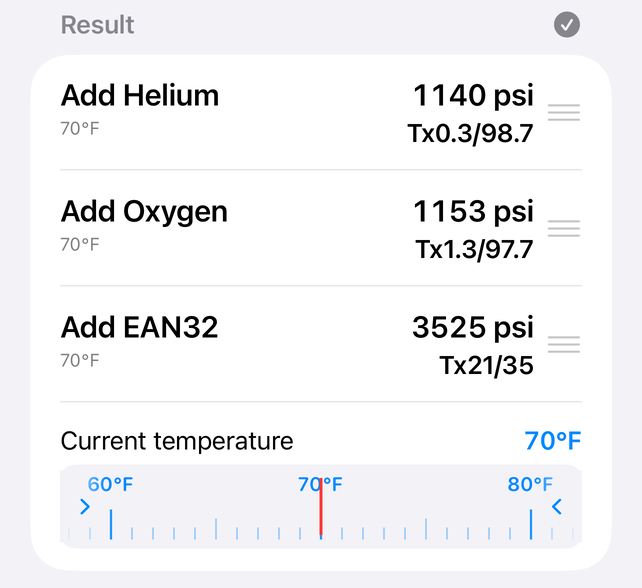
Your helium bank is nearly full and your oxygen bank nearly empty, so you'd rather add oxygen first. Tap the small icon on the right of the Result heading, then drag the steps up or down by the handles that appear on their right to change the order of the gasses — in this case, to move oxygen before the helium. Tap the same icon (now a checkmark) when you're done. However, do not change the order once you've started the blending operations.
Before rearranging the gasesAfter rearranging the gases
This reorders only this one cylinder. Settings → Order sets the default order every new result starts with instead — switch it there if you want oxygen before helium every time, not just this once. Changing it re-orders every cylinder immediately, including ones already mid-blend, so decide on a default up front rather than changing it partway through a fill.
Using preblended gas
The Preblend field does one of two things: consume a mixed gas you already have (a leftover fill, or gas that has to be bled from another cylinder), or use a non-air top-off gas (EAN 32 from a membrane compressor, say).
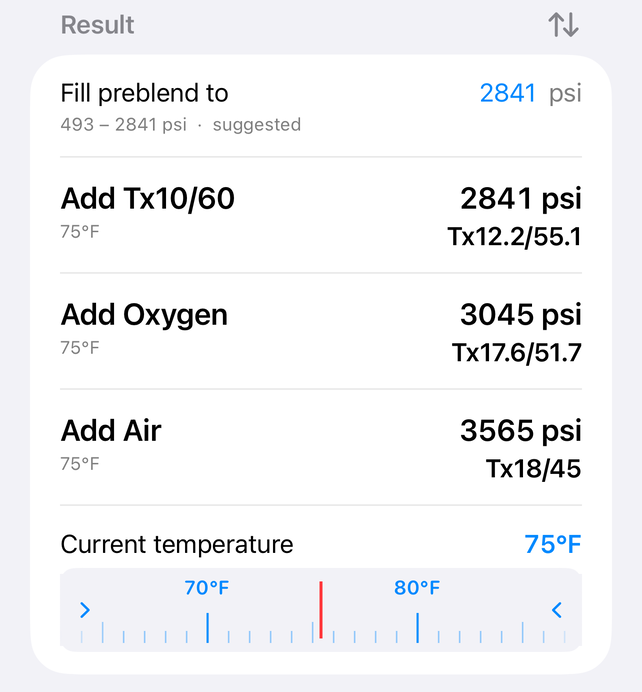
Enter Starting Tx 21/35 at 500 psi and 75 °F, Preblend Tx 10/60, and Target Tx 18/45 at 3500 psi. The steps have you add the Tx 10/60 preblend to about 2835 psi at 75 °F — iterate on temperature as usual — then oxygen and air. No pure helium is needed here; the helium content of the Tx 10/60 is what limits how much of it you can use. Preblend used this way always completely replaces one of the other three gasses.
The preblend step, fully consumed
Clear the Preblend field with the Clear button in the picker.
Preblend that runs out
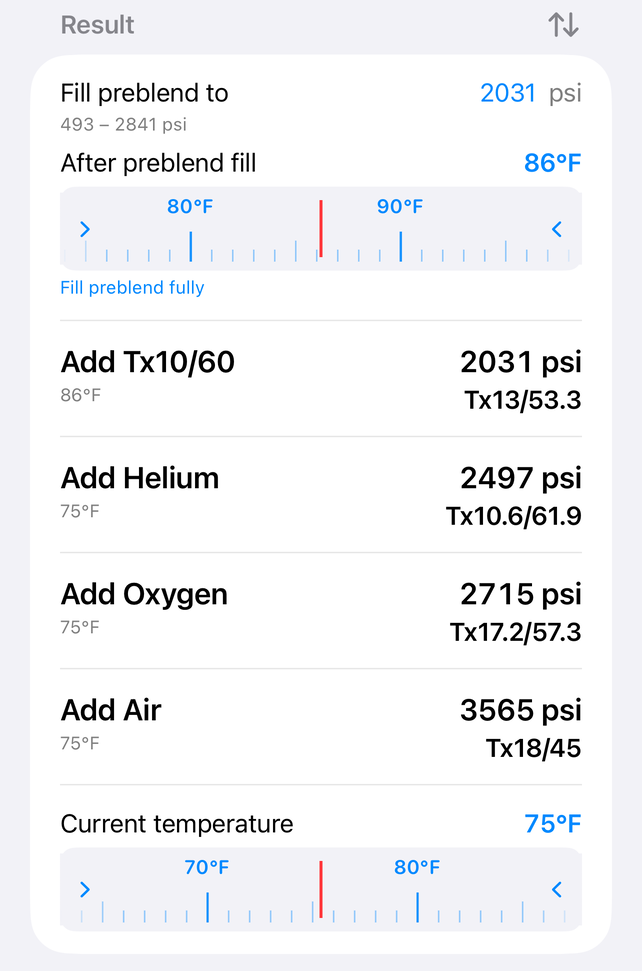
Same start as before, but you run out of Tx 10/60 before reaching the called-for pressure. At the top of the steps is a Fill preblend to field. Enter the pressure you actually reached — say 2000 psi — and a third temperature slider appears. Enter the temperature at which you reached it, say 85 °F.
The preblend contribution is now locked in and the remaining steps tell you how much helium, oxygen, and air to add. Don't change the preblend pressure or temperature once set.
A short preblend fill, with the second temperature control
A non-air top-off gas
You have a membrane system producing unlimited EAN 32 and want to use it as the top-off. Most standard trimixes can be made from helium plus EAN 32.
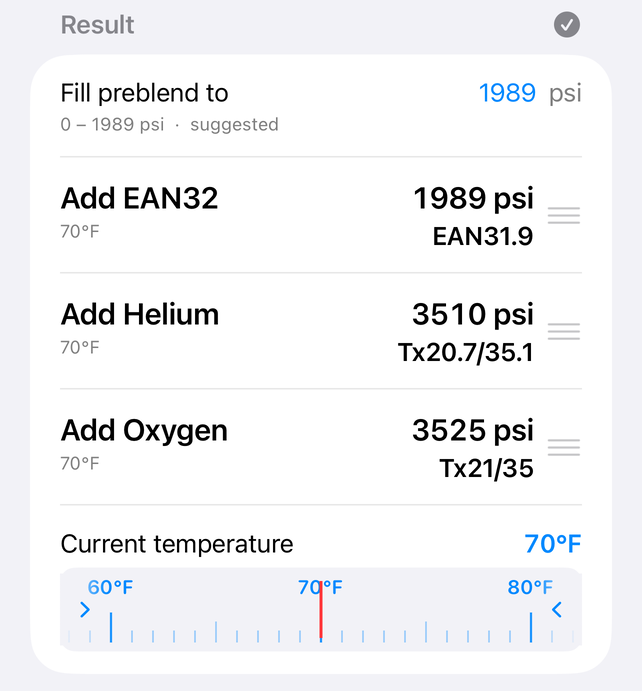
Enter Starting air at 0 psi and 70 °F, Preblend EAN 32, and Target Tx 21/35 at 3500 psi. The steps indicate first adding EAN 32, then helium, then oxygen. Because the EAN 32 comes from the compressor at high pressure, you'll want to add it last — tap the small icon on the right of the Result heading as in the previous example, and drag EAN 32 to put it last.
When you do this, you'll notice the field that let you enter how much preblend gas you'd added disappears — if the preblend gas is not the first step, the app assumes you have enough to complete the mix and will not let you add the primary gasses twice. If you do run out, analyse the gas in the cylinder and enter it as a new Starting mixture.
Before moving the preblendAfter moving the preblend
This reorders only this one cylinder. Settings → Preblend, set to "Preblend last", sets that as the default every new result starts with instead — moving the preblend step after helium and oxygen every time, not just this once. Like the Order setting in the previous example, this is global: it applies to every cylinder, not just this one.
You may see a small amount of oxygen or air still called for to hit the mix exactly. If it's tiny you can ignore it, or tune the preblend's oxygen content to minimise it.
When you can't blend that mixture
Too much nitrogen
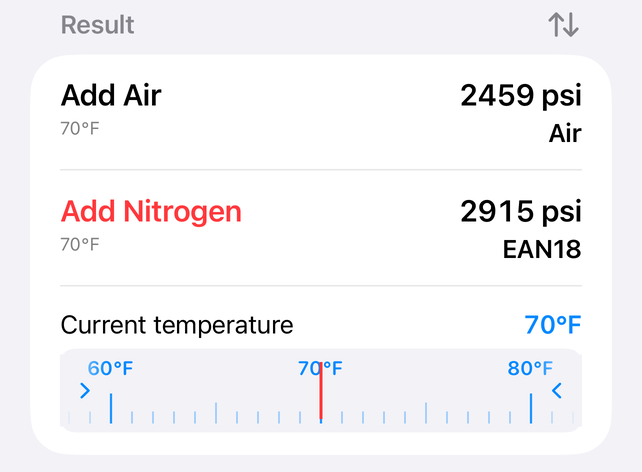
A mixture with a nitrogen-to-oxygen ratio richer in nitrogen than air (79:21) needs a source of pure nitrogen, which SCUBA shops don't have. The app will call for Add N₂ — check your Target entry, you have probably made a mistake.
The "Add N₂" step, shown in red
You can't fully empty a cylinder
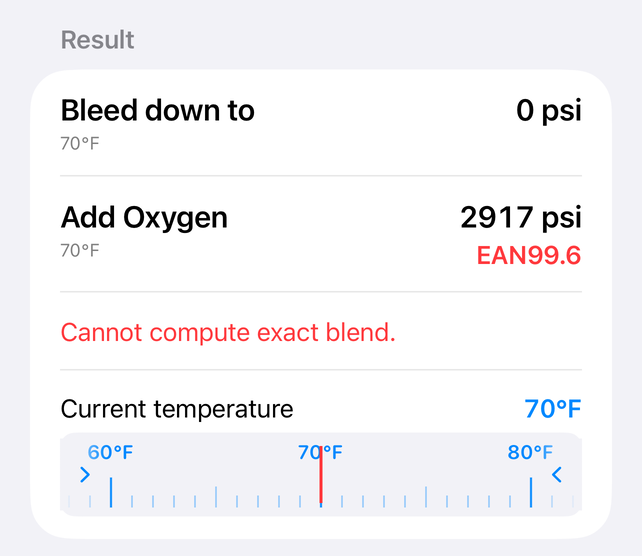
Without a vacuum pump, a bled cylinder still holds about 14.7 psi of whatever was in it. Asking for 100% oxygen from a start of air at 100 psi gives instructions to bleed to 0 and fill with oxygen, but warns Cannot compute exact blend — the result would be about EAN 99.6. For purer oxygen, purge the cylinder with oxygen first, then start from 0 psi of 100% oxygen.
The "Cannot compute exact blend" warning
The same warning appears when the start contains helium and the target does not — the app would call for emptying the cylinder of a helium mix, which wastes helium. Consider instead to set the Target helium content to whatever leaves a negligible bleed or helium addition (for Tx 18/45 at 1450 psi wanting EAN32, a target of Tx 32/20 needs only a ~3 psi bleed). Confer with the diver on how much residual helium the result will contain.
Top-off (unknown result)
Sometimes you top a cylinder up in the field with whatever gas is available and just want to know the result. Leave Target mixture blank but enter a Target pressure. For a non-air top-off gas, enter it in Preblend.
The Result shows the resulting mixture. As with a normal blend, moving the Result temperature slider updates the fill pressure for the heat rise.
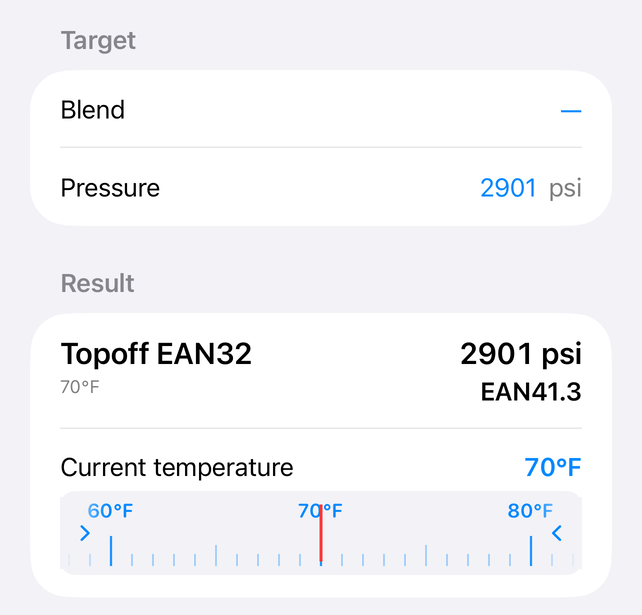
For example, a half-full cylinder with EAN50 starting at 1500 psi topped off with EAN32 to 3000 psi in the field would end with a EAN41 blend.
A top-off result
Note, this should not substitute analyzing the resulting blend before use.
Settings
Reached from the gear icon.
Pressure & volume and Temperature — unit systems, set separately.
Order and Preblend — the default fill sequence: whether the preblend goes first, and whether oxygen or helium is added first.
Top-off gas — the gas assumed for the final top-off (usually air).
Default preblend — a preblend gas pre-filled on every new cylinder. Leave blank unless you always feed from the same bank. Each cylinder's Preblend field stays editable.
STP temperature — the standard temperature the Target pressure refers to (standard pressure ratings are calibrated to 70 °F).
MOD / END presets — the three ppO₂ values shown in the gas picker, and whether END counts helium and oxygen narcosis or nitrogen only.
Blend entry — Use number-pad for blend entry types mixes instead of using the wheels.
Blend entry also has a pick from default blends switch for each of the starting, preblend and target blends: the field then opens a single wheel of your default blends, with a Custom button for any other mix.
Pricing and Bill header — O₂/helium per-volume prices, a flat air top-off charge, and labor either per cylinder or per group. See "Gas volumes & the bill". Only shown once Volumes & Pricing is unlocked.
Default blends — the list the picker's up/down arrows step through.
Features — shows Helium and Volums & Pricing as Locked (with a price to tap) or Unlocked. See "Unlocking Helium and Volumes & Pricing".
Unlocking features
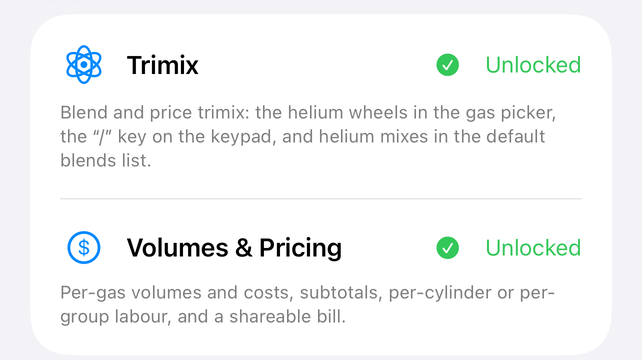
Two features are in-app unlocks, reached from Settings → Features. Depending on your region each is either an annual subscription (with a free trial) or a one-time purchase:
Helium — blend trimix: the helium wheels in the gas picker, the "/" key on the number-pad gas entry, and helium mixes in the default blends list.
Volumes & Pricing — gas volumes and costs, subtotals, per-cylinder or per-group labor, cylinder size, and a shareable bill.
Tap a feature's price to buy or subscribe. If you already own it — including a one-time purchase from a previous version of Baltic Blender, same Apple ID — it stays unlocked for good and unlocks automatically on launch; subscribers can manage or cancel from the same screen; tap Restore Purchases if it doesn't (a new device, say).
Settings → Features
Gas volumes & the bill
Requires the Volumes & Pricing unlock — see "Unlocking features".
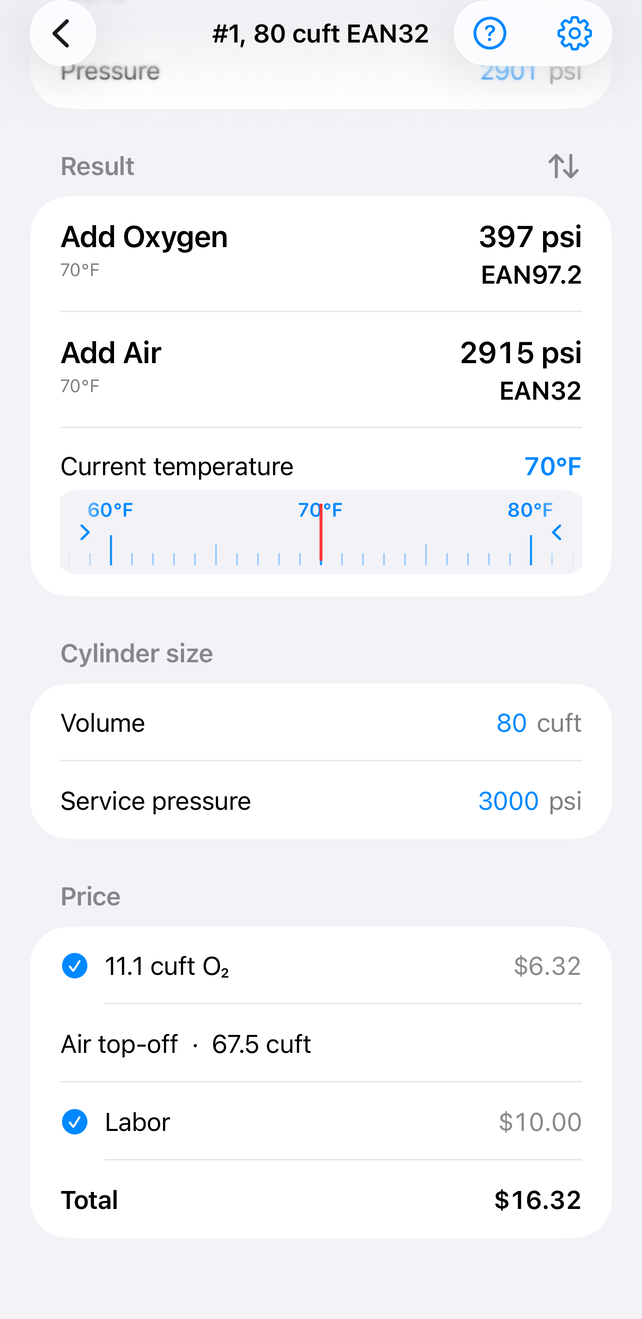
Enter the cylinder size in the Cylinder size section and the app shows the volume of each gas added, corrected to standard temperature and pressure. Set gas prices in Settings and it also totals the bill.
Cylinder size:
Imperial — the gas capacity at service pressure. An LP85 is 85 cuft at 2640 psi, even if under- or over-filled.
Metric — the water (interior) volume. A 15 L cylinder is 15 L; a US LP85 is about 13.2 L.
Doubles — double the single-cylinder figure (a set of LP85s is 170 cuft at 2640 psi, or about 26.4 L).
A priced bill — one line per gas, the preblend broken out
Each gas line shows the volume and cost, with the preblend O₂/He broken out separately. If the preblend was the customer's own gas, uncheck its boxes to leave it out of the total. In the cylinder list, a group's Share bill cell totals every cylinder in it and offers Email (a formatted table, with the header you set in Settings), Print, or Share… (AirDrop, Messages, save as a PDF, and the rest of the system share sheet).
Labor is charged one of two ways, set in Settings → Pricing: Labor, per cylinder puts a labor line on each cylinder's bill (toggle it per cylinder in the Price section); Labor, per group adds a single labor line to the group's Share bill instead. Set whichever matches how you bill — or both, if you charge a bench fee on top of per-cylinder labor.
An amusing check: a 10 L cylinder holds about 1920 L of air but about 2100 L of oxygen — oxygen compresses more readily than air.
Cylinders & groups
Baltic Blender keeps a list of cylinders so you can work on several at once — for a batch of trimix fills, add helium to every cylinder in one pass rather than switching gasses repeatedly. By the time you reach the last cylinder the first has stabilised and is ready for its oxygen.
Open a cylinder to rename it, in its Cylinder section. Until you do, it's named after its target mix and size.
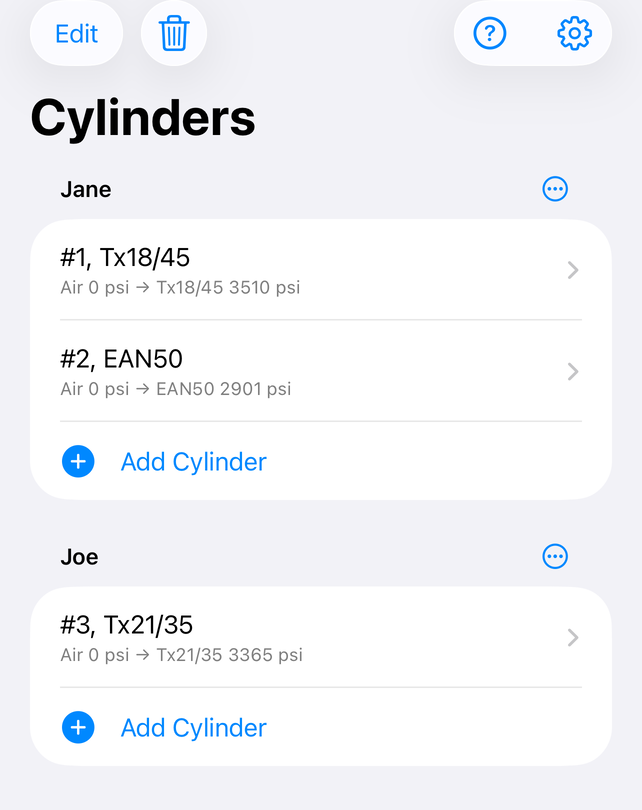
Cylinders live in named groups — tap a group's name to rename it. Its "…" menu only deletes the group (once there's more than one); each group's own Add Cylinder cell, and the list's own Add Group cell, add to it.
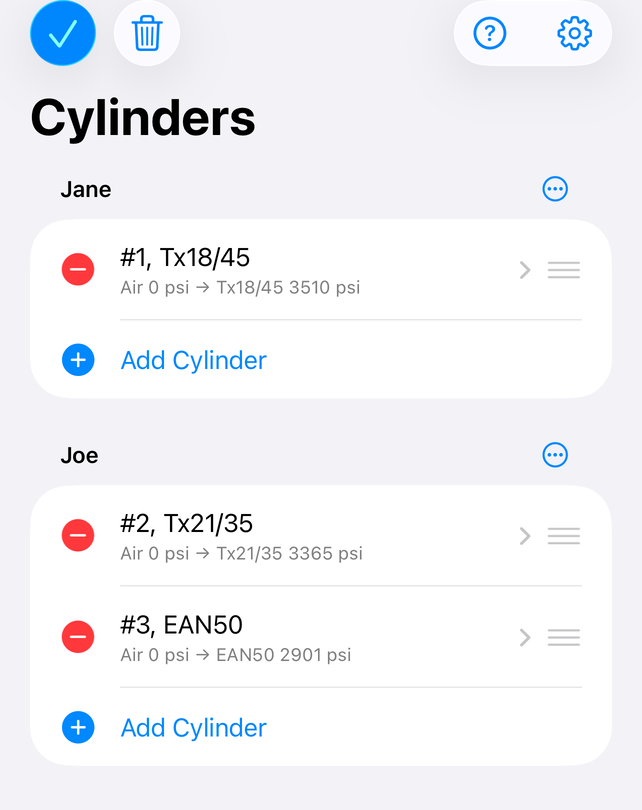
Tap Edit to reorder or delete cylinders within a group. Cylinders can't be dragged between groups — delete and re-add instead.
A group's Share bill cell totals and exports every priced cylinder in it — see "Gas volumes & the bill". It needs the Volumes & Pricing feature, same as the per-cylinder bill.
The cylinder listEdit mode
Release notes
2.0 (99)
A ground-up rewrite of Baltic Blender for modern iOS, in Swift and SwiftUI.
Same GERG-2004 real-gas blending engine as before — the numbers are unchanged.
Wheel gas picker with MOD / END readouts, and an optional number-pad gas entry.
Ruler-style temperature control; number pad for pressures.
Cylinder library with named groups; per-cylinder auto-naming.
Gas volumes and the shop bill: per-line costs, charge toggles, an editable bill header, and email/print/share export.
Helium and Volumes & Pricing are unlocked by a yearly subscription or, in some regions, a one-time purchase — and if you bought either as a one-time purchase, it's unlocked here for good, same Apple ID.
About
Baltic Blender 2.0 (99). Gasblending using GERG-2004.
Thanks to Kenneth Adelman for ideas, testing and help, and to Gabrielle Adelman for writing this documentation.
GERG-2004: Kunz, O.; Klimeck, R.; Wagner, W.; Jaeschke, M. (2007). The GERG-2004 Wide-Range Equation of State for Natural Gases and Other Mixtures, GERG Technical Monograph 15.
The partial GERG-2004 implementation used for the compressibility factors of oxygen, helium, nitrogen and their mixtures was inspired by open-source code written by David de Marneffe in December 2007.